SwiftEMR
Patient records, consultations, appointments, and billing in one clinic workspace—so your team can focus on care.
Explore SwiftEMR
Annual offer: 3 months free + free setupFree guided demo


Meet SwiftEMR, our flagship electronic medical record system for medical clinics. Explore VetCore PH for veterinary care and BizSite for your clinic’s online presence.Meet SwiftEMR, our flagship EMR for medical clinics. Explore VetCore PH for veterinary care and BizSite for your clinic’s online presence.
Try the sample without an account.Clinic verification is required before real patient use.
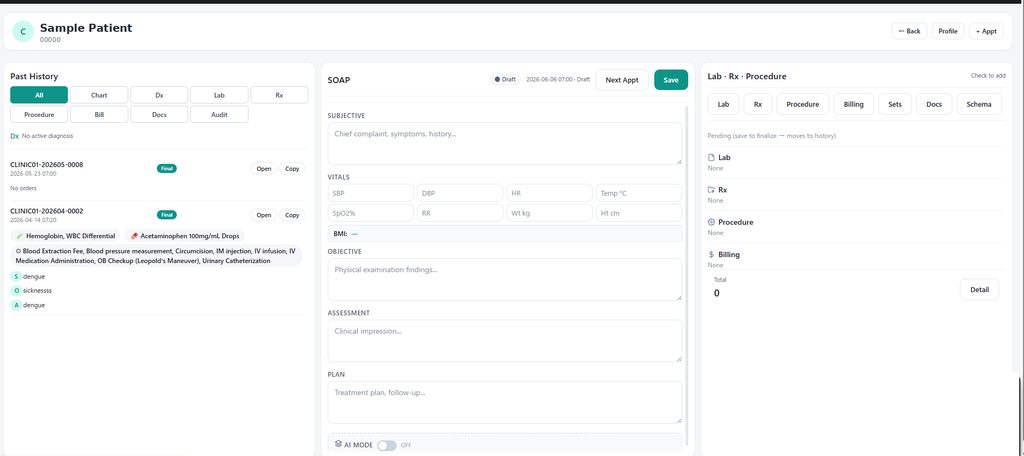
One place for the work between appointments.
Actual product screen · Sample data
Start with our flagship EMR. Explore dedicated tools for veterinary care and your clinic’s online presence.Our flagship EMR, with more ways to support your clinic.
Patient records, consultations, appointments, and billing in one clinic workspace—so your team can focus on care.
Annual offer: 3 months free + free setupFree guided demo

Free to use
Pet records, vaccination reminders, owner communication, and everyday veterinary care.
Explore VetCoreA professional home for your services, contact details, and booking requests—with hosting and updates.
Discover BizSiteExplore actual product screens with sample data.
Select a screen to take a closer look.
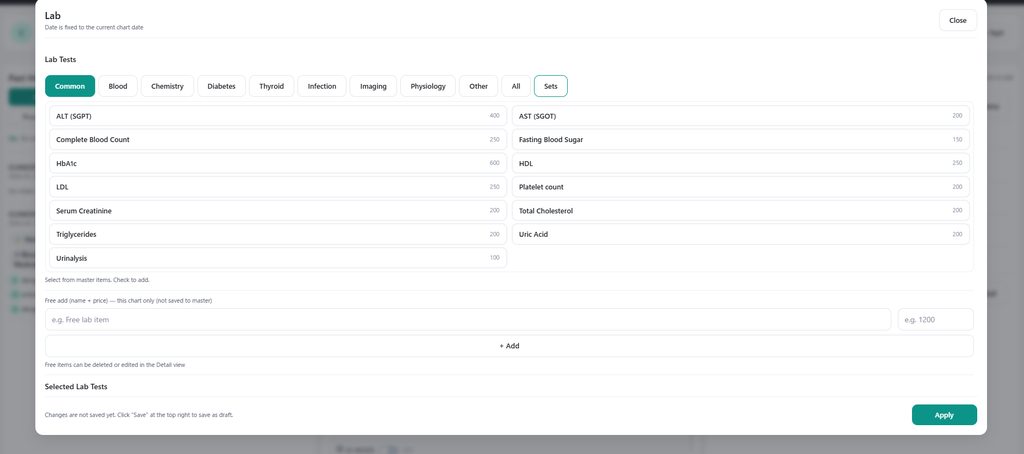
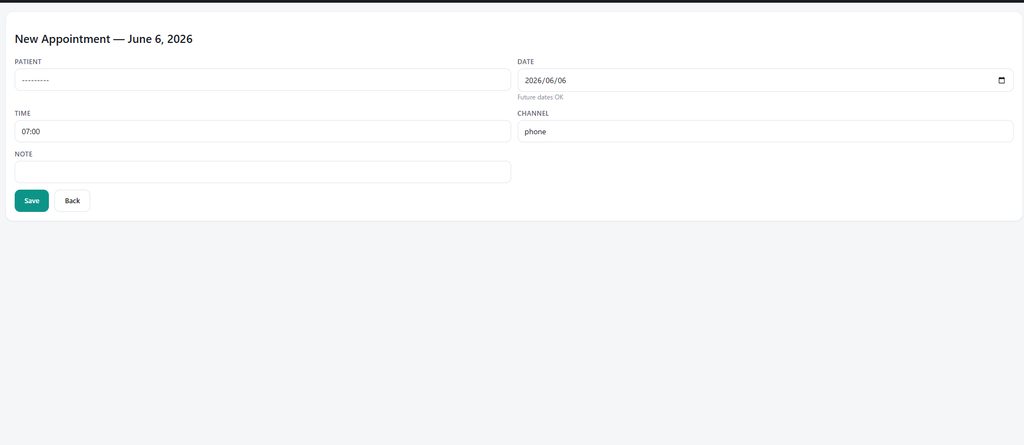
Screens supplied with this product release. Your clinic’s configuration may differ.
Meet the product and the people behind it, then follow the setup guide at your own pace.
The workspace first. Our team, your everyday workflow and the introductory offer.
The introductory offer is subject to eligibility and confirmation. Onsite support is limited to selected areas. Offer details
From registration to display preferences, doctor settings, schedules, booking and reception filters.
The annual offer requires a 12-month commitment: first 3 months free, then 9 paid months. Yearly automatic renewal and one-calendar-month non-renewal notice apply. Screens use fictional sample data.
Local understanding. Clinical experience.
One shared purpose: better tools for better care.

Marilao, Bulacan
Leads MedCore Solutions with a focus on affordable, reliable technology for medical and veterinary clinics.

Lipa City, Batangas
Leads the technology behind MedCore, with a focus on security, reliability and systems that serve clinic teams.

Japan
Runs an internal medicine clinic in Japan and co-develops the EMR, bringing clinical experience into product development.
To empower healthcare and veterinary teams with affordable, easy-to-use digital solutions that simplify daily operations, improve efficiency, and support better care for the communities they serve.
A Philippines where every medical and veterinary clinic can thrive through accessible technology and connected digital solutions—bringing better care and greater efficiency to every community.
SOAP notes and clinical suggestions in one workflow. The doctor reviews and approves before saving.
Record lab findings and keep results connected to the patient’s consultation.
Give patients a booking link and manage appointments and the queue in one place.
Track clinic charges, payments, and HMO LOAs alongside your daily workflow.
Access the clinic’s PhilHealth-related forms and reporting tools from your workspace.
Keep patient history organized with account access and activity logs.
Book a visit and register the patient.
Review history and document the encounter.
Organize results, prescriptions, and billing.
Keep the next visit and care plan in view.
A 12-month commitment with no subscription fee for months 1–3. Pay PHP 1,500 per facility/month for months 4–12: PHP 13,500 for the first year. Unlimited doctors, staff and patients. One introductory period per clinic, for its lifetime.
Initial system setup, basic training and assistance, plus agreed minor adjustments to existing settings, templates or workflows are included during the first three months.
Explore the sample before signing →Setup fee for new contracts: PHP 4,000. With this offer: PHP 0. Remote setup is available. Onsite demo/setup is free only in selected areas, after individual confirmation and appointment.
New features, major customization, integrations or significant system changes may require a separate development fee. We explain the scope and price and obtain your written approval before chargeable work begins.
The free period is part of the annual agreement, not a cancel-anytime trial. After year one, renewal is PHP 18,000/year at the current rate, without repeat free months. To stop renewal, give written notice at least one calendar month before term expiry. A notice ends the agreement at expiry; it does not cancel the remaining initial-term fees.
Separate branches need separate subscriptions. Try the fictional sample without a contract before deciding.
Please ask our team about current plans and setup support.
Ask about current plans₱1,500/ facility / month
Per facility · Unlimited doctors, staff & patients
₱800/ month
Website + inquiry/booking + hosting
Confirm the scope, billing basis, and service-agreement terms with our team before subscribing.
Multiple doctors at one facility are included. Separate branches require separate subscriptions.
SwiftEMR is our flagship EMR for medical clinics. VetCore PH is our dedicated veterinary solution. BizSite for Clinics provides a professional clinic website. Ask our team which product best fits your workflow.
Apply through the existing SwiftEMR registration page, verify your email, and follow the clinic and physician verification instructions from our team. Real patient use starts after approval and activation. The sample can be explored without registering.
Yes. Explore the fictional sample without an account, or request a remote demo before signing. The introductory offer is a 12-month commitment with months 1–3 free and months 4–12 paid. It is not a cancel-anytime trial.
Sometimes. Onsite demos and initial setup are available only in selected areas and when a team member is available. Ask us to confirm your location and appointment. Under the introductory offer, a confirmed covered visit has no additional demo or initial setup fee. Remote demos and online setup remain available when a visit is not possible.
Yes. Our clinic website service includes clinic pages, online booking, a blog or news section, and managed hosting and updates. Ask our team about the scope for your clinic.
Your clinic should review access controls, backup and recovery arrangements, and the applicable service agreement with our team before onboarding. Request the current security and data-handling details for your deployment.
The new annual offer renews automatically for 12 months. Send written non-renewal notice at least one calendar month before expiry. Your agreement ends at term expiry, not immediately; initial-term fees remain payable. Contact MedCore to agree data export and end-of-service arrangements. Existing contracts keep their agreed terms.
No. Digital tools support clinic workflows. Any AI-generated clinical suggestions must be reviewed and approved by the responsible healthcare professional.
Start with a remote demo or online setup. Onsite support is available only in selected areas, by appointment and individual confirmation.